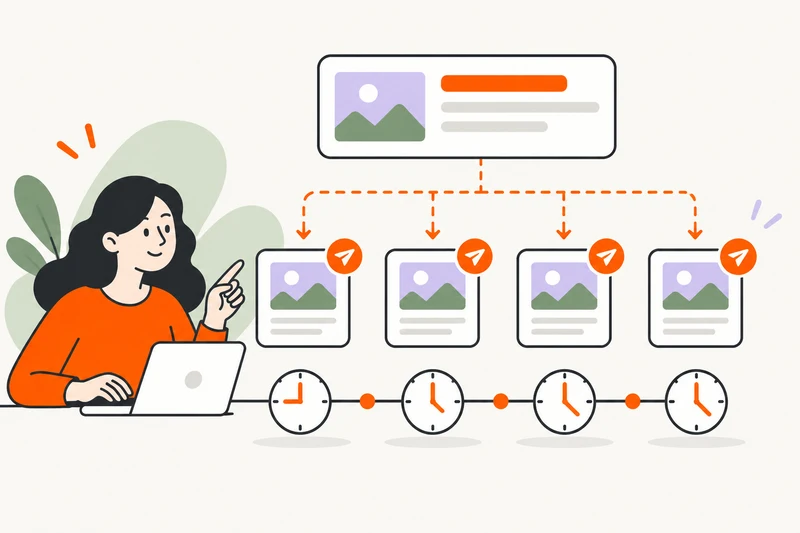
A drip-feed order divides a purchase into scheduled runs rather than sending the whole planned quantity in one submission. It is useful to understand the run quantity, number of runs and interval before offering the option to customers. Availability depends on the service and the provider connection.
Understand the three scheduling values
- Quantity per run: the amount requested in each scheduled submission.
- Runs: how many submissions are planned.
- Interval: the time between scheduled submissions.
Read the field labels in your actual order form. A form asking for quantity per run needs a different value from one asking for total quantity. Do not assume another panel uses the same field meanings.
Calculate the planned total
When quantity is entered per run, multiply that quantity by the number of runs. A hypothetical schedule of four runs at 250 units per run requests 1,000 units in total. That calculation describes the planned purchase, not a guarantee of delivered results.
Check the service’s pricing unit as well. If a compatible service is priced per 1,000 units, use that unit when reviewing the expected charge. Fixed packages or other service types may follow a different calculation.
Separate scheduled time from completion time
With a 30-minute interval and an immediate first run, the four example submissions would be scheduled at 0, 30, 60 and 90 minutes. These offsets illustrate the schedule; they are not platform defaults or promised completion times.
A provider can still have a queue, processing delay or failure. A submission interval controls when a run is due, while fulfillment depends on what happens after the provider accepts it. Explain this distinction in the service description.
Check limits and balances before enabling drip-feed
Each submitted quantity needs to fit the applicable service limits. A 1,000-unit total does not make four 250-unit runs valid if the service requires a higher minimum per submission.
- Confirm that the service supports the intended scheduling workflow.
- Check minimum and maximum quantities against each run.
- Review the effective customer charge and available balances.
- Check how failed runs and later price changes are handled in your configuration.
Do not confuse drip-feed with subscriptions
A drip-feed order has a planned sequence of runs. A subscription is a different workflow that may create orders when its own conditions are met. Check the actual service type before mapping or importing it.
A scheduling option also does not guarantee account safety, platform approval or a particular growth outcome. Describe the delivery arrangement without inventing claims about the social network involved.
Test a small eligible schedule
Follow the test through its parent order and individual runs. Check scheduled times, provider references, charges and status updates. If a run fails, investigate its response before creating a replacement that could duplicate a delayed submission.
For follow-up requests, read the refill, cancellation and partial-order guide. For catalog setup, start with provider API imports.